 Since
2008
Since
2008
Since
2008
Since
2008
Since
2008
Since
2008
Have you ever wondered what is inside a java class file? Java source file is compiled into a binary class file. JVM specification states many rules on how a java binary class should be in order to provide binary compatibility.
These binary files are used in a java virtual machine for execution. Java bytecode (instruction to JVM) are interpreted using JVM directly. Latest JVM’s convert java bytecode into native code using a just-in-time (JIT) compiler and executes the native code. This is done for better performance during the execution. Added to this, we have a monitor that watches the execution and optimizes the bytecode. Therefore subsequent execution of same java binary will result in better performance.
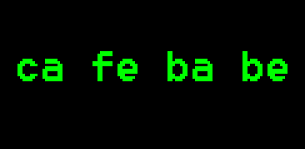
For the curious onlookers, I am going to take a simple Java hello world program and compile it to a binary class. Then open it and see what it contains.
public class HelloWorld {
	public static void main(String args[]) {
		System.out.println("Hello World!");
	}
}
I used the following compiler to compile the above program and generate a binary class file:
java version "1.6.0_23"
Java(TM) SE Runtime Environment (build 1.6.0_23-b05)
Java HotSpot(TM) Client VM (build 19.0-b09, mixed mode, sharing)
ca fe ba be 00 00 00 32 00 1d 0a 00 06 00 0f 09 00 10 00 11 08 00 12 0a 00 13 00 14 07 00 15 07 00 16 01 00 06 3c 69 6e 69 74 3e 01 00 03 28 29 56 01 00 04 43 6f 64 65 01 00 0f 4c 69 6e 65 4e 75 6d 62 65 72 54 61 62 6c 65 01 00 04 6d 61 69 6e 01 00 16 28 5b 4c 6a 61 76 61 2f 6c 61 6e 67 2f 53 74 72 69 6e 67 3b 29 56 01 00 0a 53 6f 75 72 63 65 46 69 6c 65 01 00 0f 48 65 6c 6c 6f 57 6f 72 6c 64 2e 6a 61 76 61 0c 00 07 00 08 07 00 17 0c 00 18 00 19 01 00 0c 48 65 6c 6c 6f 20 57 6f 72 6c 64 21 07 00 1a 0c 00 1b 00 1c 01 00 0a 48 65 6c 6c 6f 57 6f 72 6c 64 01 00 10 6a 61 76 61 2f 6c 61 6e 67 2f 4f 62 6a 65 63 74 01 00 10 6a 61 76 61 2f 6c 61 6e 67 2f 53 79 73 74 65 6d 01 00 03 6f 75 74 01 00 15 4c 6a 61 76 61 2f 69 6f 2f 50 72 69 6e 74 53 74 72 65 61 6d 3b 01 00 13 6a 61 76 61 2f 69 6f 2f 50 72 69 6e 74 53 74 72 65 61 6d 01 00 07 70 72 69 6e 74 6c 6e 01 00 15 28 4c 6a 61 76 61 2f 6c 61 6e 67 2f 53 74 72 69 6e 67 3b 29 56 00 21 00 05 00 06 00 00 00 00 00 02 00 07 00 08 00 01 00 09 00 00 00 1d 00 01 00 01 00 00 00 05 2a b7 00 01 b1 00 00 00 01 00 0a 00 00 00 06 00 01 00 00 00 01 00 09 00 0b 00 0c 00 01 00 09 00 00 00 25 00 02 00 01 00 00 00 09 b2 00 02 12 03 b6 00 04 b1 00 00 00 01 00 0a 00 00 00 0a 00 02 00 00 00 03 00 08 00 04 00 01 00 0d 00 00 00 02 00 0e
I used Notepad++ and its hexplugin to view the binary java class in above format, the same way as we did while understanding the serialized object using java serialization.
    ClassFile {
    	u4 magic;
    	u2 minor_version;
    	u2 major_version;
    	u2 constant_pool_count;
    	cp_info constant_pool[constant_pool_count-1];
    	u2 access_flags;
    	u2 this_class;
    	u2 super_class;
    	u2 interfaces_count;
    	u2 interfaces[interfaces_count];
    	u2 fields_count;
    	field_info fields[fields_count];
    	u2 methods_count;
    	method_info methods[methods_count];
    	u2 attributes_count;
    	attribute_info attributes[attributes_count];
    }
We have a java classloader to load this java binary class. I will write a separate article on how a java classloader works.


Comments are closed for "Java Binary".
really a great work deep and just concrete knowledge no storialization.keep it supportive and slim (KISS)
Nice Tutorial..
Thanks.
Great work..thanks
Thank you, it’s interesting
Nice Work …and keep it up.
Great Tutorial, Thanks!
Very nice .. Today I am clear about the java binary and what resides in it ..
Good one. Thanks for sharing your knowledge.
Nice artical…Thamks for sharing your komwledge.
Nice work…Thanks for sharing
hii
very good tutorial
my Question is :
Is there is any way to change java class file into java source code file(decode it)
Nice
we have a monitor that watches the execution and optimizes the bytecode.
can u tell me which monitor u r using……..
[…] since once we compile the source changes into array in bytecode. Following is a snapshot from bytecode compiled from the above […]
[…] time back I wrote about java binary class structure and I touched this slightly on that article. I recommend you to go through that article and you […]
“Latest JVM’s convert java bytecode into native code using a just-in-time (JIT) compiler and executes the native code.”
So will it be platform dependant or not?
Hi joe
given a binary number 1000100100001 is 2 ?
find minimum zeros before 1
plz tel me hw to write find this one ?
Thanks,
hari
Nice..
[…] source to running program we compile and execute it. In first step we compile the java source to binary class file. In next step binary class is executed. In java class execution, combination of interpretation […]
[…] a java source file is compiled to a binary class, compiler inserts a field into java class file. It is a public static final field named […]
[…] source code from object code. A decompiler for java should get the respective source file from its Java binary class […]
Hi joe why are you not answering the questions asked by the reader.It will be very informative if u replied those answer.
One more question:-
What feature extra is there in Stringbuffer class to make that class mutable compared to String class.
As both String and StringBuffer are final classes.So please atleast provide the answer for this.
[…] this example, we will use Java instrumentation to modify the loaded bytecode (java classes) and add statements. Using which we will find out how much duration a method executes. This is a […]
[…] us compile the above given Java source file and get a binary class file. Then de-compile that generated class file and inspect what type erasure has done. You may use any […]
i dont get u…according to u..java class file is actually binary file which i doubt it..
Java bytecode is a binary data format that includes loading information and execution instructions for the Java virtual machine. In that sense, Java bytecode is a special kind of binary code.
When you use the term “binary code” to mean machine instructions for a real processors architecture (like IA-32 or Sparc) then it is different.
Java bytecode is not a binary code in that sense. It is not processor-specific.