 Since
2008
Since
2008
Since
2008
Since
2008
Since
2008
Since
2008
Last week my wife gifted me a new mobile wishing not to miss her calls anymore. My (very very) old mobile celebrated its 7th birthday and I decided to allow it to RIP. For one reason, I held on to it for these many years. It simply did what its supposed to do, making/receiving calls and occasional use of sms.

But, the new Android mobile in my hand is completely overloaded and I feel like Bond. It has touch, a full fledged slider qwerty, proximity sensor, accelerometer, GPS and rocket launcher. Thanks to Android! and immediately after getting it, the first thought is to write an Android hello world program app.
I connected it to my home wifi network and went to the roof of my apartment. Just to see how well it picks up the signal. A neighboring kid was curiously looking at me. I thought, he was going to ask me is that a video game console? He is just in his fourth grade. Believe me he asked, ‘uncle, is that an android?’
Android fever is really catching up. If you don’t murmur about android, people won’t believe you as a technologist. If you are a software developer you should at least write a “Hello World!” in android. That’s what we are going to do in this article. We know how android gets related to java and so to a java blog. Oops! I am not mentioning about the Oracle’s case against Google claiming the presence of java code in android.
As always, Hello World is the easiest step you can keep forward in learning a language. I would say, writing Hello World is not about learning the language. It is all about learning the setting up of the development environment, how to compile, interpret / execute.
If you have completed setting up the development environment, then Android Hello World is simple. If you are using Eclipse as your IDE, setting up it for Android is also simple. Its about just installing a plugin. If you are not using Eclipse, don’t worry there are nice documentation available in android’s site.
A word of caution. If you are going to do this Hello World Android from your office computer, get necessary permissions from your manager. Since, you may be behind some proxy/firewall the software update sites might be blocked. You may get frustrated setting up the IDE.
If you are a java guy, you should be already having some JDK installed in your computer. Just check the version for compatibility. If you have a older version of Eclipse, download the latest version. No harm in having multiple Eclipse versions. Android SDK and plugin installation, just follow the instructions given the URL I have given above. They are more than sufficient.
After you install the ADT plugin, restart the eclipse. Then in Eclipse, Window -> Preferences (in left panel select Android) then give your SDK installed location in the right side panel.
If you have an android mobile and you want to execute your Hello World in that, there is a time for it. First master yourselves with the basics and you can use the Android Emulator. Always try first with the emulator before going to the real mobile. It will save you lot of time. 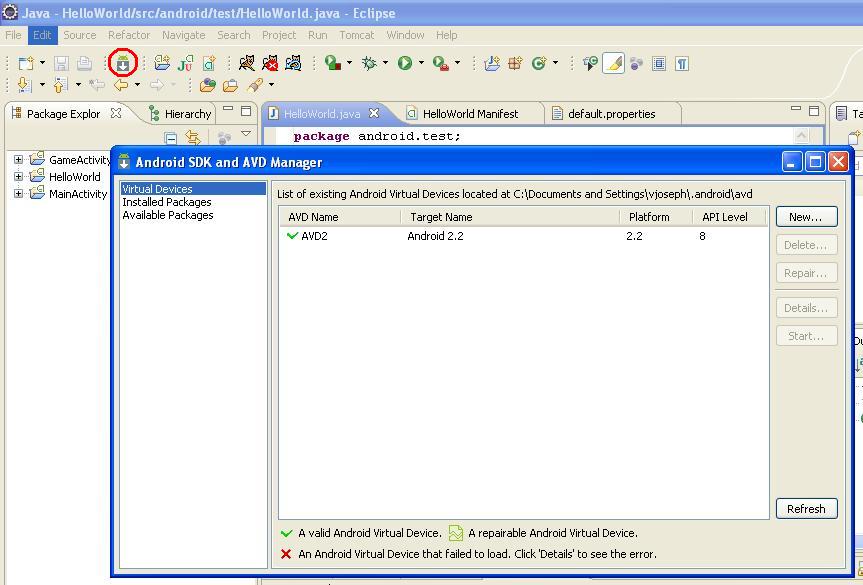
Click the android icon (with a white down arrow) from the Eclipse toolbar. I have show that icon in the below image. Then click the ‘New’ button and create a AVD. Finally it should look like the window in my image.
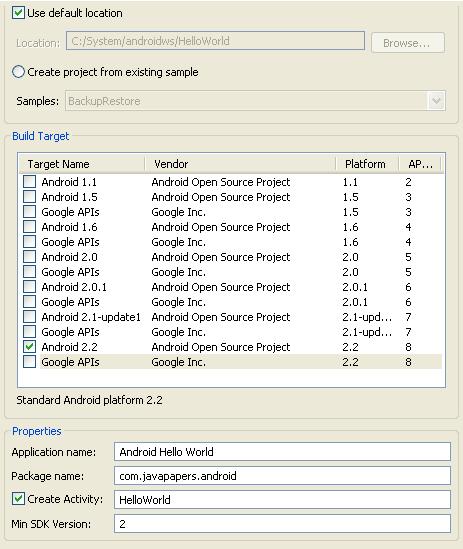
Right click in your Eclipse’s Package Explorer and New -> Android Project. Give a project name(Ex: AndroidHelloWorld), then select the Build Target. The build target should match the api version you have given at the time of AVD creation. Then fill the properties panel also.
Now the HelloWorld android project is ready to use. Open the HelloWorld.java from the project source. You should have a HelloWorld class source code similar to the below.
package com.javapapers.android;

import android.app.Activity;
import android.os.Bundle;

public class HelloWorld extends Activity {
    /** Called when the activity is first created. */
    @Override
    public void onCreate(Bundle savedInstanceState) {
        super.onCreate(savedInstanceState);
        setContentView(R.layout.main);
    }
}
Notice that you don’t have a main method. It is not needed. This HelloWorld is based on the Activity class and onCreate method will be called on initiation.
Now lets add our HelloWorld part to it. Edit the code and add the following snipped to it. Import TextView also.
        TextView tv = new TextView(this);
        tv.setText("Hello World!");
then set the contentView to the TextView you have created
setContentView(tv);
Now your Android Hello World should look like
package com.javapapers.android;

import android.app.Activity;
import android.os.Bundle;
import android.widget.TextView;

public class HelloWorld extends Activity {
    /** Called when the activity is first created. */
    @Override
    public void onCreate(Bundle savedInstanceState) {
        super.onCreate(savedInstanceState);
        TextView tv = new TextView(this);
        tv.setText("Hello World!");
        setContentView(tv);
    }
}
Right click on the project ‘Run As -> Android Application’
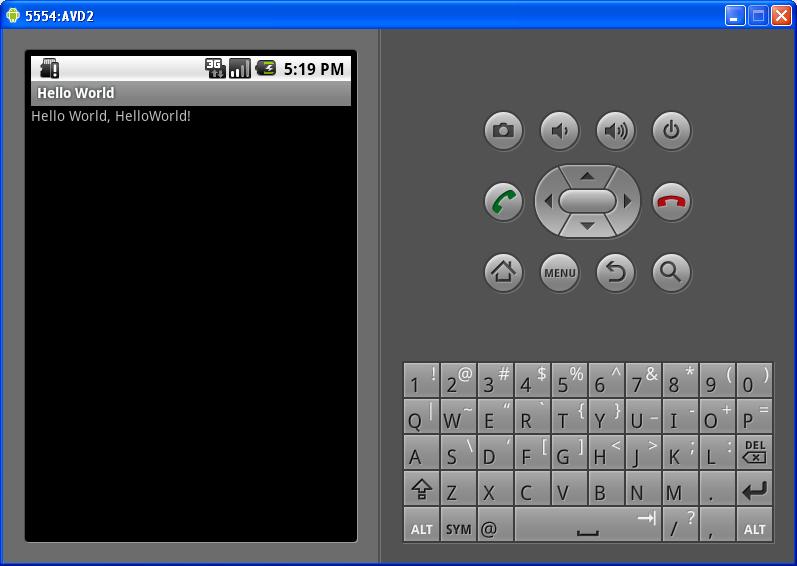
The AVD (emulator) will get started and it will take a while to respond. AVD needs that time to initialize itself. Wait for 2 to 3 minutes. Keep an eye on the console, it will give you some background process status information. Then you see “Hello World!”.


Comments are closed for "Android Hello World".
I was (am) also a believer of the fact that “Phone is for just making/receiving calls and (very) occasional SMS”.
I think we almost got our old phones (mine was Nokia 2300) in the same time (say 7 years). My old phone was working pretty much like a mule for years. After coming to US, I gave it to my MOM and it still rocking :)
What a coincidence, I just got my iPhone 3GS its only 50$ now(ofcourse with the wife factor). I know, ppl will still call me that I am in “Stone Age”. I am used to this comment with my old phone for years.
Let us start the countdown to launch a “Rocket” from our phones.
Thanks for posting the tutorial for setting up android environment. It is very useful, I have done “Android Hello World” app in my mobile successfully!
Thank, eye-opening.
Thanks for posting this, its good
Its really informative blog…Thanks you started Android tutorials.
“writing Hello World is not about learning the language. It is all about learning the setting up of the development environment, how to compile, interpret / execute.”
Such an obvious statement. And yet I’ve never seen it stated so plainly before.
So, for de-constructing the essence of Hello World, I salute you.
Nice and Simple explanation about Android.
I request you continue on writing more android tutorials.
Its nice………I feel happy when I look at hello world in my Android phone.
Can you post me some advanced concepts like sqlite db in Android.
very nice article on Android hello world…..
Please post some more Android tutorials…..
Nice and good article
please post more android articles.
Really very good blog.. It is very much helpful for those mobile developers who are new to android platform..
you did not write about moving the hello world app on the Android mobile device, please do it, your posts have more readability thanks.
These tutorials are always helpful for those of us just starting out on these types of things! Thank you for posting it, I’ll be referring back to this soon, as I hope to program a few Android apps this summer.
This made my interest’s towards Android app development.
Nice…really very useful..expecting some more concepts on Android
Just what I needed to get started. Android hello world app is so easy. One hats off to you, dear sir!
nice tutorial on android hello world…………..thanks, keep it up…..
MeeToo want to add thanks for HelloWorld-On-Android experience :)
Greetings from München. My main mobile still is a 4y+ Nokia of the 1.3-MPixel gen. Will stay with the Android-Similator for a while :)
Nice Explanation..! It creates interest in exploring. Please post on “How to launch it on Android device? “.
Give me article on thread in java ………
hi Sir ,
ur style of explation is very well n
simple.
anyone can understand easily,
so bst luck for this n b continue with ur mission.
if possible thn publish book of ur simple language.
nice easy to follow post, thank you sir.
Nice post…thanx for sharing …
Getting the below error
[2011-09-08 07:52:02 – AndroidHelloWorld] The connection to adb is down, and a severe error has occured.
[2011-09-08 07:52:02 – AndroidHelloWorld] You must restart adb and Eclipse.
[2011-09-08 07:52:02 – AndroidHelloWorld] Please ensure that adb is correctly located at ‘C:\Program Files\Android\android-sdk\platform-tools\adb.exe’ and can be executed.
nice work brother
nice work bro
very nice work. this android hello world is so easy to understand.
Sir, Please tell us more android. I am new to this field. I succeed in making a hello world app. Give us more tutorial.
Thanks.
expecting more android aritcles.. come on
Nice post thanks for posting, very informative, have you any extra snippets for Android for Motorola?, please post !
Hi Joseph, thanks for nice post! It’s really good for me – an “Android beginner”.
Hi Sir,
Language you used , look and feel of blog was superb .
Thanking you,
Praveen G
Thank you for the post. It was very helpful
It’s really nice blog and very good idea, thanks for sharing
a new approach to android fr novice guys..
All of your posts are nice. Thanks for sharing.
Hi,
I was trying to create my first Android app yesterday, also a Hello World program. Unfortunately, I am getting some errors when I try to build the project.the bellow msg was apper.what can i do sir.
[2011-12-19 10:22:19 – AndroidHelloWorld] Android Launch!
[2011-12-19 10:22:19 – AndroidHelloWorld] adb is running normally.
[2011-12-19 10:22:19 – AndroidHelloWorld] Performing com.example.AndroidHelloWorld.AndroidHelloWorld activity launch
[2011-12-19 10:22:19 – AndroidHelloWorld] Automatic Target Mode: launching new emulator with compatible AVD ‘My_avd’
[2011-12-19 10:22:19 – AndroidHelloWorld] Launching a new emulator with Virtual Device ‘My_avd’
[2011-12-19 10:22:27 – Emulator] emulator: WARNING: Unable to create sensors port: Unknown error
[2011-12-19 10:22:27 – Emulator] emulator: emulator window was out of view and was recentered
[2011-12-19 10:22:27 – Emulator]
[2011-12-19 10:22:27 – AndroidHelloWorld] New emulator found: emulator-5554
[2011-12-19 10:22:27 – AndroidHelloWorld] Waiting for HOME (‘android.process.acore’) to be launched…
[2011-12-19 10:22:59 – AndroidHelloWorld] HOME is up on device ’emulator-5554′
[2011-12-19 10:22:59 – AndroidHelloWorld] Uploading AndroidHelloWorld.apk onto device ’emulator-5554′
[2011-12-19 10:22:59 – AndroidHelloWorld] Installing AndroidHelloWorld.apk…
am the begginer for android.ur explanation is nice and easily understandable.i was make the hello world program with the help of your site. there is no error but the required output will not come.plz help me sir.only blank emulator will be appeared when i was run this program.
i did the wireup .i tried running the android project but not getng the exact output.the screen just blinks first.i found a folder called assets empty.are there any contents to be included in it.
can you post tutorial beyond hello world pls
Hi Joe,
I have my complete android setup, done last year. After reading this i am going to look it back.
Thanks.
please specify eclipse version and url to download for android development
now i am going to do hello world project in android
Thanks for such a awesome article
Hi Sir,
Thanks for nice article.
I have use this program but didn’t get the output, program is running fine.
then I have changed the last line,
setContentView(tv);
insteed of
setContentView(R.layout.main);
so I got output.
Cool post! Its has become so easy to make a simple app now!!
I runned my android hello world using eclipse classic in android platform 4.15 and i used adt plugin 16.0 version.When click run,it shows emulator and a android logo on black scren, then the AVD gets disconnected automatically without displaying message in emulator.Help me pls.I tried it several times.
plz can u give me the solution that how can i generate the lyrics of the songs in the Android player…its urgent to give me the solution for it..as soon as posible…
I would suggest to use Android phone as testing device since some of the services like location, bluetooth, google in built services, gyrosensor etc will not work in emulator. Its pretty simple and easy too to test in Android device. Just plugin and play with your developed app, no need to wait till emulator starts working :).
Sir,I want to know whether we can use our normal mobile for executing java programs…….is this possible!!!
if so can u tell me how can i run java program on my mobile…….!
pls reply!!!
[…] Manifest 26/08/2012Sometime back I wrote a tutorial on Android hello world and lots of friends asked for more on Android. With respect to Android I share the same passion […]
Good Dude
This article inspired me to set up the env for android app development. I faced issues with the cache. Each time I change a piece of code, the changes are not being reflected. I tried clearing the files under \.android\cache and uninstalling the application in emulator(Settings –> app –> Uninstall my app), but nothing helped.
[…] User Input in Android 05/09/2012I have written an Android Hello World tutorial some time back. Wouldn’t it be nice if we add some simple user interaction to it. As simple […]
It works absolutely nice. Can you write on displaying Indic Language Text in android?
I want to display Marathi text in my application.
Sure I will write a tutorial soon on displaying Indic language text in Android.
[…] Create a new Android application project to broadcast a content entered by the user. The content to be broadcasted will be taken from the user through a main Android activity component. On clicking the send button, this content will be send to the broadcast receiver component. For that the activity layout contains a content edit text field and a send button. […]
I always enjoy your articles and for sure you are a great man.
Hiii all,
I have launched my emulator and my app is there on the screen but when i click on the icon of my tab only splash screen comes for 2 or 3 sec and then again it returns to the home screen.
MY avd Configuration
Device Name- 5.1 ” WVGA(400* 800)mdpi
Target- Android 4.2.2- API level 17
RAM -512MB (**although my RAM is 2 GB but there i am not allowed to give it more than 512**)
VM heap- 32
Internal Storage -500
error in log- 2013-05-11 13:36:32 – SplashScreen] Failed to install SplashScreen.apk on device ’emulator-5554!
[2013-05-11 13:36:32 – SplashScreen] (null)
[2013-05-11 13:36:33 – SplashScreen] Launch canceled!
I have already restarted my device, i hav increased heap size, i have changed the device but nothing is working ………..Please help
[…] take a sample scenario to understand it better. Let TextView be an object (recently programming in Android and so using its class for example :-)) and we will have program generated ids used for its […]
[…] creating a basic template app, refer my previous Android hello world tutorial. In this step we need to provide input domain for user to send their request for performing the […]
hi joe
in this article u said to add the text view to setContentView (setContentView(tv)) which is not reflecting in your result program
where do i add this code
[…] by step instructions to setup the Android development environment. Long back I wrote a tutorial for Android Hello World. In that tutorial, I gave an overview for setting up the Android development environment. Looks […]
Hi JOe,
Thanks for writting on Android. Its really simple and well structured.
I started with the “HelloWorld” project.
First time I got ouput but latre I changed the string value in tv.setText(“—–“);.
And rerun the code but the string is not changing the emulator and in console it says like this:
[2014-01-30 14:43:22 – AndroidHelloWorld] Android Launch!
[2014-01-30 14:43:22 – AndroidHelloWorld] adb is running normally.
[2014-01-30 14:43:22 – AndroidHelloWorld] Performing com.example.androidhelloworld.MainActivity activity launch
[2014-01-30 14:43:22 – AndroidHelloWorld] Automatic Target Mode: launching new emulator with compatible AVD ‘AVD2’
[2014-01-30 14:43:22 – AndroidHelloWorld] Launching a new emulator with Virtual Device ‘AVD2’
[2014-01-30 14:43:23 – Emulator] emulator: warning: opening audio input failed
[2014-01-30 14:43:23 – Emulator]
[2014-01-30 14:43:23 – AndroidHelloWorld] New emulator found: emulator-5554
[2014-01-30 14:43:23 – AndroidHelloWorld] Waiting for HOME (‘android.process.acore’) to be launched…
[2014-01-30 14:44:50 – AndroidHelloWorld] HOME is up on device ’emulator-5554′
[2014-01-30 14:44:50 – AndroidHelloWorld] Uploading AndroidHelloWorld.apk onto device ’emulator-5554′
[2014-01-30 14:44:51 – AndroidHelloWorld] Installing AndroidHelloWorld.apk…
[2014-01-30 14:45:53 – AndroidHelloWorld] Success!
[2014-01-30 14:45:53 – AndroidHelloWorld] Starting activity com.example.androidhelloworld.MainActivity on device emulator-5554
[2014-01-30 14:45:56 – AndroidHelloWorld] ActivityManager: Starting: Intent { act=android.intent.action.MAIN cat=[android.intent.category.LAUNCHER] cmp=com.example.androidhelloworld/.MainActivity }
It is getting stuck. I am not getting how to proceed. Could you please help me in this?
Thanks & Best Regards,
Yeshaswini
I am still a Window user. But after reading your post I become curious about Android. I will surely use Android now to get into detail. Thanks for the information.