 Since
2008
Since
2008
Since
2008
Since
2008
Since
2008
Since
2008
AJAX is an acronym for Asynchronous JavaScript And XML. AJAX provides an ability to communicate with the server asynchronously. Here asynchronous is the keyword. To explain that in simple terms, you can send a request to server and continue user interaction with the user. You need not wait for response from the server. Once the response arrives, a designated area in UI will update itself and reflect the response information. Whole page need not be reloaded.
This is achieved by AJAX using XMLHttpRequest object. Your browser provides the capability for XMLHttpRequest object. Most modern browsers provides support for XMLHttpRequest. This object helps for http request and process XML response. It is not mandatory that you should use only XML. Simple text can also be used in Ajax but which is uncommon.
Before continuing with the article, I assume that you have basic knowledge about http headers, request response mechanism, different method types and response codes. If you lack knowledge in these areas, it is better to update them before proceeding. If you cant read GET, POST, HTTP status 200 OK and response Content-Type: text/html, xml then you must know these topics before learning AJAX. I am not writing in detail about them here, because each one of them calls for a detailed separate article.
Let me write a HelloWorld ajax web application to demonstrate basics. We shall have a button with name ‘Say Hello!’ On click of that button, without reloading the whole page we will display “Hello World!” by replacing the ‘Say Hello!’ button. Following source code listing contains complete code of sample web application.
<html xmlns="http://www.w3.org/1999/xhtml">
<head>
	<title>Getting Started with AJAX using JAVA</title>
	<meta http-equiv="Content-Type" content="text/html; charset=utf-8" />
	<script type="text/javascript" language="javascript" src="ajax.js"></script>
</head>
<body>
	<div>Getting Started with AJAX using JAVA: Hello World!</div>
	<div id="hello"><button type="button" onclick="makeRequest()">Say Hello!</button></div>
</body>
</html>
index.jsp contains a div ‘hello’. That is the div which XMLHttpRequest object is going to overwrite with response from Servlet. On click of the button we call a java script function makeRequest(). Until now, there is nothing special. Its usual jsp and javascript call. Ajax is not in the picture.
Now go through makeRequest() given below. Inside that we call getXMLHttpRequest() which returns a XMLHttpRequest object. That can be used as a utility method in all your AJAX programs. Thats an attempt to standardization. Different versions of browsers provide different ways of creating XMLHttpRequest. We are covering all possible combinations inside that method.
Once we get XMLHttpRequest object, we need to register a function which will be called on state change. Now its time to explain in detail about XMLHttpRequest object.
XMLHttpRequest consists of properties readyState, status, statusText, responseText and responseXML.
XMLHttpRequest contains an event ‘onreadystatechange’. It is invoked whenever ‘readyState’ property given above changes.
We need to register a function for the above event ‘onreadystatechange’. In our makeRequest(), after getting xmlHttpRequest object we register getReadyStateHandler(xmlHttpRequest). Therefore whenever there is a state change, this function will be called by the XMLHttpRequest / browser.
After registering the callback funtion we set the request url as the HelloWorld servlet. In web.xml we have done the servlet mapping for that servlet.
In getReadyStateHandler function, if readyState is 4 and http status code is 200 then we set the reponse text from XMLHttpRequest object to the div hello in index.jsp.
/*
 * creates a new XMLHttpRequest object which is the backbone of AJAX,
 * or returns false if the browser doesn't support it
 */
function getXMLHttpRequest() {
	var xmlHttpReq = false;
	// to create XMLHttpRequest object in non-Microsoft browsers
	if (window.XMLHttpRequest) {
		xmlHttpReq = new XMLHttpRequest();
	} else if (window.ActiveXObject) {
		try {
			// to create XMLHttpRequest object in later versions
			// of Internet Explorer
			xmlHttpReq = new ActiveXObject("Msxml2.XMLHTTP");
		} catch (exp1) {
			try {
				// to create XMLHttpRequest object in older versions
				// of Internet Explorer
				xmlHttpReq = new ActiveXObject("Microsoft.XMLHTTP");
			} catch (exp2) {
				xmlHttpReq = false;
			}
		}
	}
	return xmlHttpReq;
}
/*
 * AJAX call starts with this function
 */
function makeRequest() {
	var xmlHttpRequest = getXMLHttpRequest();
	xmlHttpRequest.onreadystatechange = getReadyStateHandler(xmlHttpRequest);
	xmlHttpRequest.open("POST", "helloWorld.do", true);
	xmlHttpRequest.setRequestHeader("Content-Type",
			"application/x-www-form-urlencoded");
	xmlHttpRequest.send(null);
}

/*
 * Returns a function that waits for the state change in XMLHttpRequest
 */
function getReadyStateHandler(xmlHttpRequest) {

	// an anonymous function returned
	// it listens to the XMLHttpRequest instance
	return function() {
		if (xmlHttpRequest.readyState == 4) {
			if (xmlHttpRequest.status == 200) {
				document.getElementById("hello").innerHTML = xmlHttpRequest.responseText;
			} else {
				alert("HTTP error " + xmlHttpRequest.status + ": " + xmlHttpRequest.statusText);
			}
		}
	};
}
A simple Hello World servet sending response as Hello World! as text.
package com.javapapers.sample.ajax;

import javax.servlet.http.HttpServlet;
import javax.servlet.http.HttpServletRequest;
import javax.servlet.http.HttpServletResponse;

public class HelloWorld extends HttpServlet {

	/**
	 * A simple HelloWorld Servlet
	 */
	public void doPost(HttpServletRequest req, HttpServletResponse res)
			throws java.io.IOException {
		res.setContentType("text/html");
		res.getWriter().write("Hello World!");
	}

	public void doGet(HttpServletRequest req, HttpServletResponse res)
			throws java.io.IOException {
		doPost(req, res);
	}
}
<?xml version="1.0" encoding="UTF-8"?>
<web-app xmlns:xsi="http://www.w3.org/2001/XMLSchema-instance" xmlns="http://java.sun.com/xml/ns/javaee" xmlns:web="http://java.sun.com/xml/ns/javaee/web-app_2_5.xsd" xsi:schemaLocation="http://java.sun.com/xml/ns/javaee http://java.sun.com/xml/ns/javaee/web-app_2_5.xsd" id="WebApp_ID" version="2.5">
  <display-name>Getting Started with AJAX using JAVA</display-name>
  <welcome-file-list>
    <welcome-file>index.jsp</welcome-file>
  </welcome-file-list>
  <servlet>
    <servlet-name>helloWorld</servlet-name>
    <servlet-class>com.javapapers.sample.ajax.HelloWorld</servlet-class>
    <load-on-startup>1</load-on-startup>
  </servlet>
  <servlet-mapping>
    <servlet-name>helloWorld</servlet-name>
    <url-pattern>/helloWorld.do</url-pattern>
  </servlet-mapping>
</web-app>
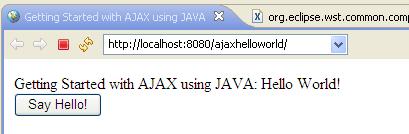
Before AJAX call:
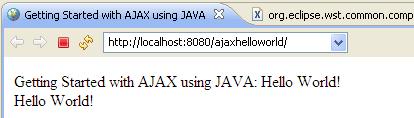
After AJAX call:
I have used text response to demonstrate AJAX. There is a lot more to AJAX. I will get into using XML, advanced techniques and jquery in future articles.


Comments are closed for "Getting Started with AJAX using Java".
Great!
Such a short and simple example to understand AJAX :)
thanks for posting
Good article. It is very stright forward and no mess in explaination.
Please post the article on AJAX with XML as one example and JQuery.
Thanks
Anand Garlapati
Good Artical and helpful for beginners!!!
great! very simple, and the base to understand the use of complex frameworks!
Thanks a lot! I wasted a lot of time to run hello ajax using java until i found this one.God Bless U! Keep Helping!!!!!!
HI,
I don’t have any server to execute the above program.If I execute it,am getting alert with “Http Error 2:Unknown” Is it possible to execute in my local system without any server.
Regards
Ramesh
Hi,
I too prefer to use jquery.
Nice one. Also Please explain JSON with AJAX
how to make calculator using ajax?
superb
Nice tutorial ..very helpful
Hi,
I have three jsp pages.
in first jsp page i have one add button when this is clicked i made a call to ajax function
now the ajax is called and kept the contents in first jsp
now the contents which are added are one select list and textfield
now when i click the select list which was added again i have to call ajax and should keep the contents of third jsp..
is it possible to call ajax like this
pls reply me………
I Love this Example… It Was Simply Superb..Explaining the whole flow in a single basic example, it was really good one….!!!!
Hey Can u Just Help me in drag and drop events in ajax, I need to create a form builder in java by using ajax, Can i expect good examples on that… Waiting for your reply… :-)
This ajax tutorial really simple and superb. Keep it up
Lots of thanks for u, such a great example.
El mejor ejemplo para empexar con ajax que he visto en la red
HI,
im getting HTTP ERROR 404:
WHILE excecute above prgm.. plz help me
Hi,
Nice one,i understood the basic working of Ajax,i need some complicated examples……..
thanks a lot for giving this article….
thanks 4 the description
hi,
I tried this above example, but im getting two errors “XMLHttpRequest cannot be resolved to a type” and “ActiveXObject cannot be resolved to a type”..
Plz provide solution for this…
Thanks,
srinivas G.
Hi sir,
your website helped me to do lot of works in my firm,
now i need a help from you, i am creating a web application like facebook sharing proceess with java and oracle.
So i need some help from you, how to make the sharing process?
Thanking you.
your article is very good.it help me alot.
simple but too good
Excellent Sir. We have learnt a lot from this tutorial.
Neat & Clean in each & every post.. i went through more than half of your posts until just never get that much info on a single site..
Please post regarding Jquery & Spring Framework also.
Very Useful Material of AJAX and Java. Basically important for every begineers like me.
Thank you very much.
Very Useful Material of AJAX and Java. Basically important for every begineers like me.
Thank you very much.
its simple laugage use…
Gr8 very good and small example .very well we can understand .Gr8 effort
please set download link on page…..
This is very well designed from the page layout to the introduction of components and explanations. Very nice Joe!
easy to understand for beginner .
provide coding with tutorials
Asam fro beginers
Asam for beginners
it is very easy to understand
Is it very easy ..
thank you for such best explanation…
good explanation for beginners.. thanks
Hi!
I want to upload an image
It will go like this
Browse an image
Click on Upload button
When the button on an HTML Page is clicked, it will call an AJAX function which will call Servlet so that page doesn’t get refreshed. After processing on server side, the page should display the uploaded image(if successful) or error message(in case not uploaded).
Please give some idea that how do establish communication from AJAX to Servlet and then from Servlet to AJAX, and also what to pass from AJAX to Servlet and also what to catch from Servlet to AJAX.
Please help me out.
Regards
Abhinav
That was good code i was searching from a long time and your blog helped me a lot.
Nice Example. Good for beginners to take a step over in ajax.
It’s a good stuff to start with and clear for any new developer
Thank YOu for posting it.
Really a very nice tutorial.. Thanx a lot..
Thanks Q very much
its really excellent example for beginner
A Simple Example for Beginners.
ThankYouVeryMuch
Perfect Sir..
I was looking for similar example to understand very basic concept of using ajax with servlets and jsp.
Thanks a lot.
dear sir,
i can understand the ajax concept,but i need populating the dropdownbox.
if i select one dropdwonbox value, the next dropdownbox value will be change according to the first dropdownbox.
for exanple;
if i select country the state dropdownbox will be change according to country dropdownbox
can you help me…
Thanks
Thanks for such a Nice article!
this is well for ajax beginers thanks for ur blogs…..
Simply useful. Also the Javapapers.com website is super.!!!!Hands of…
very useful.. thx
Hi Joe,
Nice Article, please post article using xml also it is really helpful.
Ranjit
nice example.
can you give an example for returning json object for theajax request.
very good and simple ajax tutorial. Thanks for this.
This is good Program for beginners and intermediate
Good Work Joe.. please keep it up.
Simply Superb!! Good blog for AJAX-beginners like me.
Thanks a lot.
This blog is really awesome.
Joe your way of explaining concepts is very simple and helpful. Your all blogs are very informative. Thanks !!
Great Job!! Carry on Joe
Very Nice Article for beginners & Easy to understand for implementing.
this is very good to rad and see..such a great job done by you..very good site..
nice 1
Nice page..:P
nice
Nice tutorial..
Similar example works fine.
But I am facing a problem while calling the servlet from a JSP page which is under some folder under web-content.
should I add any path prefix to the servlet URL pattern other than that mentioned in Web.xml.
Could anyone please help..
Thanks,
Sudha
Hello Sir,
This was the great tutorial about ajax and any one who is new in web tech, can easily learn ajax from hear, but I have another question about Comet.
As I surf so many sits but didn’t get any satisfactory answers or example about the same. but what i learn, Comet is nothing but reverse ajax. So can you help me on this topic?
Very Nice Article for beginners & Easy to understand for implementing.
Hai Joe,I read your java related stuff,it is very interesting and very usefull also.Can you publish about Junit testing in your next Article.Thank for your knowledge sharing
could you please post some more examples ??
It will be very helpful.
thanks
the article was very helpful joe
ye kya chutiya pa hai yaar kuch or dalo example me
Thank u Joe good article. very useful
Sir,I got an error at the end of return function()
error is: syntex error when we close return function at this place };
return function()
{
if (xmlHttpRequest.readyState == 4)
{
if (xmlHttpRequest.status == 200)
{
document.getElementById(“hello”).innerHTML = xmlHttpRequest.responseText;
} else
{
alert(“HTTP error ” + xmlHttpRequest.status + “: ” + xmlHttpRequest.statusText);
}
}
};
HI Joe, If possible can you please explain the Country–>State–> City example using Ajax.
Thanks in advance
Bhabani
Nice Description ,thank you for post .
its very helpful !!
Nice article
Ty dude. Very helpfull.
Hats of you
Realy great Blog and great work
Good job keep it up ,We all programmer proud of you..
Thanks
Hi,
Why are you using a closure in the getReadyStateHandler function?
Very good article. It is very stright forward and no mess in explaination.
Please post the article on AJAX update.
like facebook notification.
Short n simple Article….:)
Excellent article for the beginners in Ajax!!
Waaaaaa Finally something today worked. My Ajax on Java book is totally useless(well not really i knew from the schema in it where your files should be placed in Eclipse).
Simple example that works and easy to get the concept of AJAX. Exactly what I was looking for..
Superb Website For Java Buddies
Very nice useful for all java Buddies…
thank you .
Thaks a lot…
Very nice example to understand AJAX easily.
Great Joe :)
Thanks Joe… For making our task easy….
it is ok, but when we are using tiles in spring, how to take a div id…
good to know!!Thanks
code is working fine in IE but there is some problem with FireFox..(Orogin null) :(
Thank you sir
Thanks Joe for such a simple and understandable Document on AJAX
thaks… for giving simple example.. this is very good for fresher
Very Very thanks!
It is very beneficial for beginner. I start learning ajax with the help of this post.
Thank you. Its a very good example for beginners like me
Awesome tutorial dude !!
how to maintain the drop down list data static after submitting ?
please send the reply ASAP.
Good tutorial for a fresher…
thank..it was easy to understand..:)
hi ,
i tried the above example but i am getting a popup 404 http not found when i click on say hello !!
Please help
Thanks for posting
Thanks!!
very nice tutorial
Yes… Its very good example.
At the beginer stage, we have to starting with this. But after clearing concept we must have to use Ajax with Jquery, its very easy also.
So.. Joe please post some nice example Ajax with Jquery Demo.
After getting the reposne from JSP i want to check where it is success or failure in javascript.
like
var data = ajaxObject.responseText;
if(data ==”success”)
alert(data);
else
alert(“failure”);
But i was failed in getting success data.
please help
Hi Joe,
I have a problem using Ajax or Javascript in my development. I am developing a package which is based on client-server method. i have a java package(jar) which is used to display a file properties in GUI mode on client side. i placed that jar file in the webserver. while i am trying to access or invoking the java class from javascript/ajax, i could not deploy it. Can you suggest any ways to deploy the jar file to execute on client side.?
This is a very good tutorial.But i have a query. I tried this code with a jsp page. In my case the state of xmlHttp request changes from 0 to 1.But it never becomes equal to 4. So i am unable to proceed .Could you please help me in this regard.It would be very kind of you.
thanku thanku……..
very nice easy explanation.
Why we use —
xmlHttpRequest.setRequestHeader(“Content-Type”,
“application/x-www-form-urlencoded”);
first of all..i would like to thanks u for ur very short and simple example.can u plz guide me for hosting new personnel website..
thanks man !
also i had lots problem with these issue but finally solved
by use your code
Simple and easy to understand as usual.
That’s your trademark Joe.
Keep up this good work of making people understand the concepts.
Hey can you suggest any book to learn AJAX with Java Examples?
I’m new to AJAX. This is just what I was looking for.
Hey your program works like a charm. Thank you so much. God Bless you.
How to send data using xmlHttpRequest.send and get value in servlet