 Since
2008
Since
2008
Since
2008
Since
2008
Since
2008
Since
2008
serialVersionUID is used to ensure that during deserialization the same class (that was used during serialize process) is loaded. This is a one line definition to explain why a serialVersionUID is used?
Apart from the above definition there are quite a few things to learn from this serialVersionUID. As per javadocs, following is format of serialVersionUID:
ANY-ACCESS-MODIFIER static final long serialVersionUID = 42L;
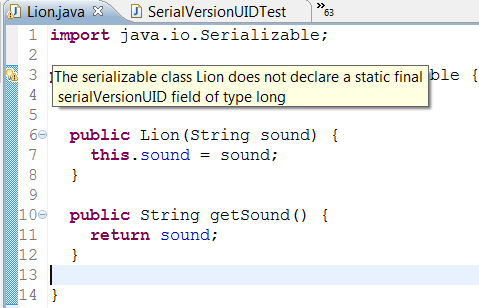
Lets start with annoying warning message you get in your IDE when you declare a class as Serializable.
The serializable class Lion does not declare a static final serialVersionUID field of type long
Most of us used to ignore this message as we always do for a warning. My general note is, always pay attention to the java warning messages. It will help you to learn a lot of fundamentals.
serialVersionUID is a must in serialization process. But it is optional for the developer to add it in java source file. If you are not going to add it in java source file, serialization runtime will generate a serialVersionUID and associate it with the class. The serialized object will contain this serialVersionUID along with other data.
Even though serialVersionUID is a static field, it gets serialized along with the object. This is one exception to the general serialization rule that, “static fields are not serialized”.
serialVersionUID is a 64-bit hash of the class name, interface class names, methods and fields. Serialization runtime generates a serialVersionUID if you do not add one in source. Refer this link for the algorithm to generate serialVersionUID.
It is advised to have serialVersionUID as unique as possible. Thats why the java runtime chose to have such a complex algorithm to generate it.
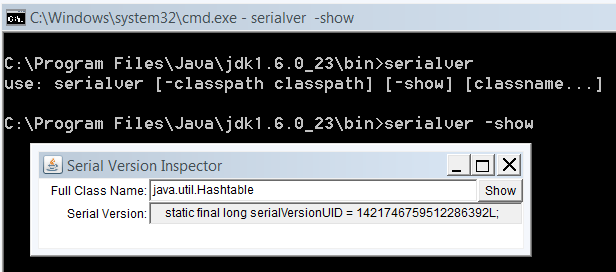
If you want help in generating it, jdk tools provides a tool named serialver. Use serialver -show to start the gui version of the tool as shown below.
When an object is serialized, the serialVersionUID is serialized along with the other contents.
Later when that is deserialized, the serialVersionUID from the deserialized object is extracted and compared with the serialVersionUID of the loaded class.
If the numbers do not match then, InvalidClassException is thrown.
If the loaded class is not having a serialVersionUID declared, then it is automatically generated using the same algorithm as before.
Javadocs says,
“the default serialVersionUID computation is highly sensitive to class details that may vary depending on compiler implementations, and can thus result in unexpected InvalidClassExceptions during deserialization”
Now you know why we should declare a serialVersionUID.
Not only declaring a serialVersionUID is sufficient. You must do the following two things carefully. Otherwise it defeats the purpose of having the serialVersionUID.
serialVersionUID should be maintained. As and when you change anything in the class, you should upgrade the serailVersionUID.
Try your best to declare a unique serialVersionUID.
Initial class to be serialized has a serialVersionUID as 1L.
import java.io.Serializable;

public class Lion implements Serializable {

  private static final long serialVersionUID = 1L;
  private String sound;

  public Lion(String sound) {
    this.sound = sound;
  }

  public String getSound() {
    return sound;
  }

}
Test serialVersionUID:
import java.io.FileInputStream;
import java.io.FileOutputStream;
import java.io.IOException;
import java.io.ObjectInputStream;
import java.io.ObjectOutputStream;

public class SerialVersionUIDTest {

  public static void main(String args[]) throws IOException, ClassNotFoundException {
    Lion leo = new Lion("roar");
    // serialize

    System.out.println("Serialization done.");
    FileOutputStream fos = new FileOutputStream("serial.out");
    ObjectOutputStream oos = new ObjectOutputStream(fos);
    oos.writeObject(leo);

    // deserialize
    FileInputStream fis = new FileInputStream("serial.out");
    ObjectInputStream ois = new ObjectInputStream(fis);
    Lion deserializedObj = (Lion) ois.readObject();
    System.out.println("DeSerialization done. Lion: " + deserializedObj.getSound());
  }
}
Serialization done.
DeSerialization done. Lion: roar
Now change serialVersionUID to 2L in Lion class.
private static final long serialVersionUID = 2L;
Comment the “serialize” block (4 lines of code) in SerialVersionUIDTest. Now run it and you will get the following exception.
Exception in thread "main" java.io.InvalidClassException: Lion; local class incompatible: stream classdesc serialVersionUID = 1, local class serialVersionUID = 2
	at java.io.ObjectStreamClass.initNonProxy(Unknown Source)
	at java.io.ObjectInputStream.readNonProxyDesc(Unknown Source)
	at java.io.ObjectInputStream.readClassDesc(Unknown Source)
	at java.io.ObjectInputStream.readOrdinaryObject(Unknown Source)
	at java.io.ObjectInputStream.readObject0(Unknown Source)
	at java.io.ObjectInputStream.readObject(Unknown Source)
	at SerialVersionUIDTest.main(SerialVersionUIDTest.java:21)


Comments are closed for "serialVersionUID in Java Serialization".
Nicely simplified
Nice One.
can you share a some other aspects serialization.
it would be very helpful
Nice One.
can you share a some other aspects of serialization.
it would be very helpful
A nice Read, Keep Posting.
Simple and short as usual :)
simplified explanation.
Thank you
Awesome explanation. And the best part is the picture :-)
Wow !!! I used to ignore such a message everytime that I encountered one. Now I know the meaning of it. Nice post.
Great example. So thanks
Love your explanations of concepts. Whenever I need a visual note in my head of a concept, I always turn to your posts. I think it is genius to be able to say in such simple terms such convoluted topics. Keep posting!
The last example clearly explains the need for serialization , I think we shud pay attention to serialization when we use webservices right ?
very good stuff about serialVersion ID.
Thank you very much!
i am very much satisfied with ur explanation. i am eager to learn lot of things in java. thanks a lot..
In the above explanation, the serialver tool is used where we installed java.
but our java class file is in some other folder like D:\sample\Test.java and java installed path is in c:\Program files\java\jdk1.6.0\bin. how to get serialuid for my Test.java class.
a good paragraph
Thank you Joe! you really rock.
Best thing is the simplicity of your writing. Luv javapapers.
Nice work Joe, Thanks for your article. I have a question. What will happen if we serialize an object in 1.5 JVM and deserialize in 1.3 with serialVersionUID?
Thanks in advance.
than2s s5r f6r th5s va34ab3e *6st
Its really nice one.
I think most of the developer don’t the fact why this warning is coming.keep posting.
Kindly Explain how serialization happening.How Compile know the object is implementing Serilization.
I am glad to read this paper, it’s so helpful
very good explanation.its really helpful for those who have interest in programming.
i am happy about this concept
Excellent *********
Such a nice explanation…..Thank u joe
Nice Post Thanks….
Nice One.
can you share a some other aspects of serialization.
it would be very helpful
Thanqu this tutorial is really good.
Nicely explained..
WIll object serialized in one java version (Say 1.4) can deserilazed in another (Say 1.5 or 1.6)??
well explained, now finally i understand the meaning of serialversionuid in java
thanks.
Its very nice explanation !.. Keep posted.
Thanks,
Ganesh
Nice Post Thanks….
Thanks,
Tirupathireddy N
Nice concept !!
Very good concept..
—
Ram
Nicely explained..
Thanks
Abhishek
m gudu konda
too good………
Gud Explanation, with example. Keep Posting
Very Useful
Facinating, excelents explanation sir, tx a mil.
Just to Say thanks,
Thanks for the nice article. Question: I understand that the serialVersionUID is read from the deserialized class, but I didnt get to which classes serialVersionUID it will be compared to.
Cool man nice blog
Thanks for the blog.
Neat explanation.
-Raghu
Very Nice Explanation
Very precise document on Serialization ,
Pics depicting real sense !
Nice explanation. :)
Your blog rocks !! I think i am too late to view your blog. Simple and clear explanations. Appearance of blog creates more interest while reading. :)
Apart from this, is it possible to make the page width a little wider.?
Really impressed,
Your writing style is to much clear and easily can understand . Thanks
if we use serializaion to sava an object on memory then we modify that class(definatly object has changed now) now we deserialize that object what will be happen, kindly answer
if we use serialization to save an object on memory then we modify that class(definatly object has changed now) now we deserialize that object what will be happen, kindly answer
Its really good one.
Nice
Nice Blog. Thanks
Very clear and easily undestable
Hi Joe,
Thanks for this very nicely composed article.
it is really good…joe..and it is helpful for me.
nice know about the serialVErsionUID. super keep post more. good.
nice know about the serialVErsionUID. super keep post more. good.
I don’t agree with ”This is one exception to the general serialization rule that, “static fields are not serialized”.
can we serialize the resultset?
I am confused with ”This is one exception to the general serialization rule that, “static fields are not serialized”.”
If Static field not serialized then what diff with transient.
I am confused with ”This is one exception to the general serialization rule that, “static fields are not serialized”.”
If Static field not serialized then what diff with transient?
Good One Thank you Sir.
Most of doubts has been solved.
thanks joe
Fantastic code and Example is there
thanks Joe
How can we serialize a static variable, its mentioned in many java books that a variable declared as static and transient cannot be serialized
good example for Serialization
Thanks
good example
really grea8 work….joe keep it up…….man………………
very nice and clear explanation…
i have one query..what will happen if my proj having 2 classes has the same serial version uid.. will it be a problem????
Good one……
Solid Explanation
Explained very well..nice one
Its too good…and clearly explained..
Thanks
Very nice, clean an effective explanation.
Thanks for writing, keep it up :-)
Your explaination is simply superup,
Please can you explain why the serialVersionUID is in static and how this static field is beeing serialized.
thanks dude.. Nice explanation…
Great explanation.
Thanks very much.
Nicely explained .. but What if i give same serialVersionUID to two classes
Good Artical. Thanks for giving valuable informations
Thanks for valuable information..keep posting
Nice Explanation
gr8 Job Sir
excellent explanation !!
Keep going like this !
very very good……
very very good…
Nice!! Very well explained :)
“Even though serialVersionUID is a static field, it gets serialized along with the object” I just want to know what is the concept behind it. how serialVersionUID is serialized. And why they are doing like this otherwise they could have made serialVersionUID as simple instance varible then they can serialize the serialVersionUID. so my question is why and what is need?
Nice blog
If my class properities are being changed after serialization and then further if I deserialize it, then what happens..can you please through some light on this? thanks in advance
nice explanation..
good example
good example
nice explanation
Nice Blog.. Keep Up doing the great work.
agreed. how do you populate the FullClassName field on the show serialver panel
very easy to understand…thanks
The image at the beginning of the tutor looks cool and funny :P. Nice Article.
nice,u r explaining very good and simple ,easily understand everybody
Thanks
While I ran the test according to article I posted, I had left out “final” modifier of serialVersionUID, but the test ran without any problem. But When I rechecked the code I found the mistake and rectified. Thanks for sharing such an article. Also I would like to know the USE CASE of serialization that when it is used. I am java Enterprose web developer so let me know the context where it is used?
Thanks
Amit
Its an exelent explanation. I never seen this type of explanation so that it will help me to improve my knowledge.
Thanks,
David.
Sir, Great work…
Thanks for the explanation….
Your contents in every tutorial are very authentic and nicely explained….
Vary nice article
That is my question too.
It is comparing, one value from the de-serialized object with the one declared in the class itself. If the serialVersionUID is absent, it’s calculated by a complex algorithm. Since different JVM implementations might have variations on the computation, that could result in a mismatch. That is why a serialVersionUID is highly recommended.
The serialVersionUID only needed to be updated when there is incompatible type changes in the class. See more details in the spec,
http://docs.oracle.com/javase/6/docs/platform/serialization/spec/version.html#6678
This is not a problem, the version only matters in the context of the same Serializable class. You can consider it a version ID of the class.
Since the version ID is used only within the context of the object versioning, I don’t see why this need to be computed using the serialver util, a simple “1L’, then “2L” would just do the same job.
what will happen after serialization any changes has been made?which exception we will get?
Great work joe, till now I don’t know why we use serial vesrion id….
Great post
Keep posting
What happens when we serialze a singleton class (that is we implemented the serialize interface)?
Then how singularity is maintianed.
Hi joe , if serial id is static then how it get serialized this question was asked by a company
any one have an idea please reply
Even though serialVersionUID is a static field, it gets serialized along with the object. This is one exception to the general serialization rule that, “static fields are not serialized”.
So it is internally configuration in jvm for specially this field
gud 1
nicely explained…
Awesome ….
pls explain how hashmap work internally….
superb explanation! After googling lot of stuffs, this one helps a lot. Thanks!
Simplest post with valuable and quick understandable knowledge.
superb explanation!
please provide pagination for list of comments on your website.
It will add to the convenience for the page navigation.
Thanks
The language and example used by you is very helpful to understand the concept.
Thanks a ton Joe,your blogs are really helping us …………..
Hi,
Can you please tell why some of the classes don’t have serialVersionUID like java.util.Arrays.
Explained in detail with simplest possible manner….
very Good example,simply super Sir
” My general note is, always pay attention to the java warning messages. It will help you to learn a lot of fundamentals.”
— Thanks for this :)
Similar to the 2010 article from mkyoung.com but anyway Thanks.
Good explanation.
Thanks
Mahesh
Please explain public vs private vs protected serialversionUID.Since we have to make unique serialversionUID why it is not private by default
I still don’t understand why did you say – “As and when you change anything in the class, you should upgrade the serailVersionUID”??
if I remove one of the property from my class(if I change serailVersionUID I wont be able to deserialize my old serialzed object but I don’t want that).
I also dont understand why serailVersionUID should be unique?? if I have 10 classes under my project, I can give same UID to all the classes as the are not related to each other
Good example and explanation.Thank you Joe…
Hummmmmmm ….. Good for start up but Please explain what happens if serialversion UID is same and fields are changed and what is case of 1L …. that will make this post better
Simple and easy to understand.
Excellant work done by you.
nice article joe